Kenyon Ndezi
  • Home
  • Discover
  • Finance
    • Business
    • Banking
    • Invest
  • Lifestyle
    • Travel
    • Food
  • Blogging
    • SEO
    • Troubleshoot
    • Themes
    • Plugins
    • WordPress Tips
featured
  • A Practical Guide to Canadian Immigration: How to Write Explanation Letters Without Over-Reliance on ChatGPT
    • November 9, 2023
  • The Top Money Mistakes to Avoid in Your 20s and 30s
    • April 17, 2023
  • Old typewriter on white background.
    Mailchimp Error Fix: The requested resource could not be found
    • November 25, 2022
  • 5 Tips for Managing Your Finances as a Freelancer
    • April 16, 2023
  • The Pros and Cons of Living in a Digital Nomad Community
    • April 16, 2023
Kenyon Ndezi
  • Home
  • Discover
  • Finance
    • Business
    • Banking
    • Invest
  • Lifestyle
    • Travel
    • Food
  • Blogging
    • SEO
    • Troubleshoot
    • Themes
    • Plugins
    • WordPress Tips
Home Posts WordPress Theme Doesn’t Allow You To Remove Footer Credits? Learn How To Do It!
  • Themes

WordPress Theme Doesn’t Allow You To Remove Footer Credits? Learn How To Do It!

  • August 22, 2021
  • Kenyon Ndezi
Total
2
Shares
0
0
2

There are different reasons why someone would want to remove footer credits on their WordPress site. Some people prefer a cleaner aesthetic, while others favor adding their own footer credits.

Depending on the theme, the option to remove footer credits may not be available. In this case, you’ll need to download a plugin called Visual Footer Credit Remover. This plugin makes the whole process easier as you won’t have to deal with HTML or text edits that might damage your website. The plugin will visually present the footer in a familiar interface, and text can be altered similar to editing a post.

Install Visual Footer Credit Remover
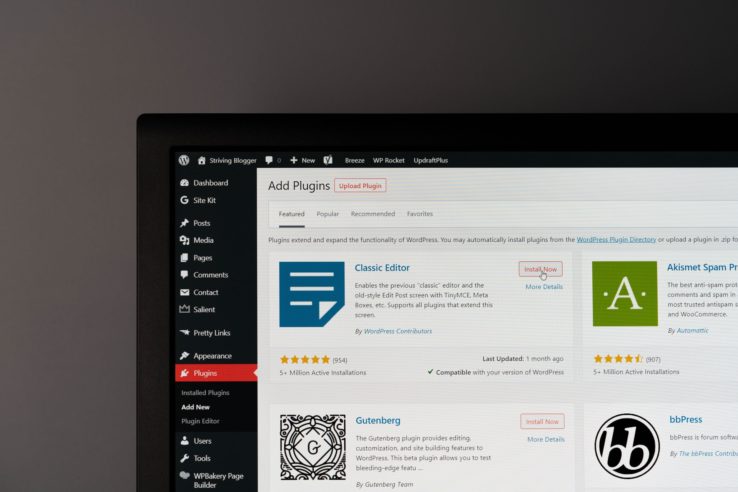
While logged in to your WordPress admin panel, head over to Plugins>Add New and search for Visual Footer Credit Remover. Select the plugin and click install. After installation, don’t forget to activate the plugin.

How to use Visual Footer Credit Remover

  • Head over to Tools>Visual Footer Credit Remover
  • Once the plugin is clicked, a visual editor will be presented.
  • Scroll down to the footer and edit credits.
  • You can also delete credits and leave it blank.

Get started with WordPress: HOW TO START A BLOG

Total
2
Shares
Share 0
Tweet 0
Pin it 2
Kenyon Ndezi

Kenyon Ndezi is a recent graduate, writer, creator of vividbay.com, and the owner of Neonbuild.com, which is a company focused on building apps for small businesses and individuals. Follow along and get inspired!

You May Also Like
View Post
  • Themes

The Best WordPress Themes for Lifestyle Bloggers

  • Kenyon Ndezi
  • April 17, 2023
View Post
  • Themes

How to Use WordPress for Your Travel Blog

  • Kenyon Ndezi
  • April 16, 2023

Leave a Reply Cancel reply

Your email address will not be published. Required fields are marked *

Featured
  • Why you should consider moving to Canada
    • January 7, 2023
  • How to get over gym anxiety.
    • February 22, 2022
  • The Thriving Tech Scene in Newfoundland: Discover the Best Companies to Work For
    • June 3, 2023
  • Ultimate Ways To Make Real Sustainable Money Online.
    • August 5, 2021
  • How to Speed Up Your WordPress Site: A Comprehensive Guide for 2023
    • March 18, 2023
Latest
  • Why I Regret Putting a Bed in My Office
    • January 29, 2026
  • Conquer That Interview: Your Guide to Ace Your Next Opportunity
    • February 2, 2024
  • Why I usually finish my Google searches with Reddit
    • February 1, 2024
  • Why is There no Uber in St. John’s Newfoundland?
    • January 31, 2024
  • A Practical Guide to Canadian Immigration: How to Write Explanation Letters Without Over-Reliance on ChatGPT
    • November 9, 2023
Categories
Banking
11 Posts
View Posts
Blogging
5 Posts
View Posts
Business
10 Posts
View Posts
Finance
15 Posts
View Posts
Food
3 Posts
View Posts
Invest
14 Posts
View Posts
Lifestyle
9 Posts
View Posts
Travel
15 Posts
View Posts
Wordpress Tips
5 Posts
View Posts
You Might Like
  • A laptop screen showing OpenAI's website, with ChatGPT related information. 1
    With ChatGPT on the rise, is blogging still relevant?
    • March 19, 2023
  • 2
    Why you should consider moving to Canada
    • January 7, 2023
  • 3
    How to Create a Successful Travel Itinerary
    • April 16, 2023
  • 4
    The Ultimate Guide To Improve SEO Rankings In 2022
    • March 22, 2022
  • 5
    Top Budget Travel Destinations for Digital Nomads
    • April 17, 2023
SUBSCRIBE TO OUR NEWSLETTER
Kenyon Ndezi
  • Contact
  • About
  • Privacy Policy
Business & Lifestyle

Input your search keywords and press Enter.